If you want to use this program for Windows XP then you can get it for free from Microsoft.
Here is the link:
http://www.microsoft.com/DownLoads/details.aspx?familyid=435BFCE7-DA2B-4A6A-AFA4-F7F14E605A0D&displaylang=en
Monday, August 24, 2009


Friday, August 14, 2009
Error: Action failed for registry key AVG antivirus error
When trying to install the free AVG antivirus I received the following computer error:
Error: Action failed for registry key HKLM\SOFTWARE\Microsoft\Windows NT\CurrentVersion\Windows: creating registry key
After some research it seems to be a permission problem ,to solve this do the following:
Click Start ,Run and then type regedit and then OK.
Now navigate to that key in the registry ,start at the top left side and click to expand the keys one by one.
Starting with HKLM (which is short for HKEY_LOCAL_MACHINE.)
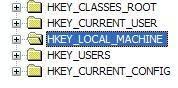
And then Software ,Microsoft ,Windows NT ,CurrentVersion ,Windows.
On the Windows key right click it and choose the option permissions.
On the permissions tab click on the Advanced button near the bottom right.
On the Advanced menu make sure all the users are set to Allow and not Deny ,if they are set to deny then select that user and click on Edit ,then click and mark the full control checkbox.
Restart the computer and AVG will now install.
If you get an access denied error when trying to change these settings then the best would be start the system in Safe Mode and then log in with the administrator account and try the steps from there.
Change your current antivirus to Panda Antivirus Pro 2010 and forget these problems.
Free trial period too :)
Error: Action failed for registry key HKLM\SOFTWARE\Microsoft\Windows NT\CurrentVersion\Windows: creating registry key
After some research it seems to be a permission problem ,to solve this do the following:
Click Start ,Run and then type regedit and then OK.
Now navigate to that key in the registry ,start at the top left side and click to expand the keys one by one.
Starting with HKLM (which is short for HKEY_LOCAL_MACHINE.)

And then Software ,Microsoft ,Windows NT ,CurrentVersion ,Windows.
On the Windows key right click it and choose the option permissions.
On the permissions tab click on the Advanced button near the bottom right.
On the Advanced menu make sure all the users are set to Allow and not Deny ,if they are set to deny then select that user and click on Edit ,then click and mark the full control checkbox.
Restart the computer and AVG will now install.
If you get an access denied error when trying to change these settings then the best would be start the system in Safe Mode and then log in with the administrator account and try the steps from there.
Change your current antivirus to Panda Antivirus Pro 2010 and forget these problems.
Free trial period too :)
Friday, June 19, 2009
Philips printer and fax drivers.
Philips doesn't support their faxes nor printers since 2002 as it was bought by Sagem ,so all support is done through them.
To get drivers for your philips product go here:
http://support.sagem-communications.com/site/page_accueil.php?site=1&pays=uk
To get drivers for your philips product go here:
http://support.sagem-communications.com/site/page_accueil.php?site=1&pays=uk
Thursday, May 14, 2009
how to export your address book in Outlook Express 6
To export your address book contacts in Outlook Express 6 do the following.
Open Outlook Express and click on Address book or Tools ,Address book.
When the address book opens click on File ,Export and then Address Book (WAB).
Choose the destination and give it a name and then click on Open.
The address book has now been exported to be used on another computer or if you just want a backup.
Open Outlook Express and click on Address book or Tools ,Address book.
When the address book opens click on File ,Export and then Address Book (WAB).
Choose the destination and give it a name and then click on Open.
The address book has now been exported to be used on another computer or if you just want a backup.
how to save or export your email account in outlook express 6
If you want to save or export your email account in Outlook Express 6 to be used on another computer or to just make a backup do the following:
Open Outlook Express click on Tools ,Accounts and make sure the Email tab is selected.
Click on the current email account and then click on Export on the right hand side ,choose the destination and give it a name.
That's it.
If you want to import it on another computer do the same steps but click on Import on the right hand side.
Open Outlook Express click on Tools ,Accounts and make sure the Email tab is selected.
Click on the current email account and then click on Export on the right hand side ,choose the destination and give it a name.
That's it.
If you want to import it on another computer do the same steps but click on Import on the right hand side.
how to install TCP/IP protocol in Windows XP
If you need to install TCP/IP on your computer ,in case you deleted it or some or other reason then do the following instructions from Microsoft:
Right-click the network connection, and then click Properties.

Click Install.
Click Protocol, and then click Add.Click Have Disk.
Type C:\Windows\inf, and then click OK.
On the list of available protocols, click Internet Protocol (TCP/IP), and then click OK.
If Internet Protocol (TCP/IP) does not appear, follow these steps:
Click Start, and then click Search.
In the Search Companion pane, click More advanced options.
Click to select the following three check boxes:
Search system folders
Search hidden files and folders
Search subfolders
In the All or part of the file name box, type nettcpip.inf, and then click Search.
In the results pane, right-click Nettcpip.inf, and then click Install.

Restart the computer.
Right-click the network connection, and then click Properties.
Click Install.
Click Protocol, and then click Add.Click Have Disk.
Type C:\Windows\inf, and then click OK.
On the list of available protocols, click Internet Protocol (TCP/IP), and then click OK.
If Internet Protocol (TCP/IP) does not appear, follow these steps:
Click Start, and then click Search.
In the Search Companion pane, click More advanced options.
Click to select the following three check boxes:
Search system folders
Search hidden files and folders
Search subfolders
In the All or part of the file name box, type nettcpip.inf, and then click Search.
In the results pane, right-click Nettcpip.inf, and then click Install.
Restart the computer.
Monday, May 4, 2009
how to display the quick launch menu on the taskbar windows XP
The quick launch has the show desktop icon and also allows you to add shortcuts from your favourite programs to be "quick launched".
Here is how to display it on the taskbar if it already isn't.
Right-click on any free space on the taskbar and on the menu that appears select the option Toolbars and the toolbars menu appears click on the quick launch option to activate it.
It should now appear on the taskbar ,to be able to drag shortcuts to the quick launch toolbar make sure the taskbar is not locked.
Here is how to display it on the taskbar if it already isn't.
Right-click on any free space on the taskbar and on the menu that appears select the option Toolbars and the toolbars menu appears click on the quick launch option to activate it.
It should now appear on the taskbar ,to be able to drag shortcuts to the quick launch toolbar make sure the taskbar is not locked.
Subscribe to:
Posts (Atom)

 Posts
Posts


 Stumble It!


